Shopify order cut-off times, holidays and closed dates
Almost every wrong delivery date comes from the same place: the store counted days the warehouse was shut. Cut-off times, weekends, bank holidays and your own closed dates are unglamorous settings, and they are the difference between an estimate that builds trust and one that generates refunds. This covers what to configure, in what order, and the edge cases that catch people out every December.
·7 min read
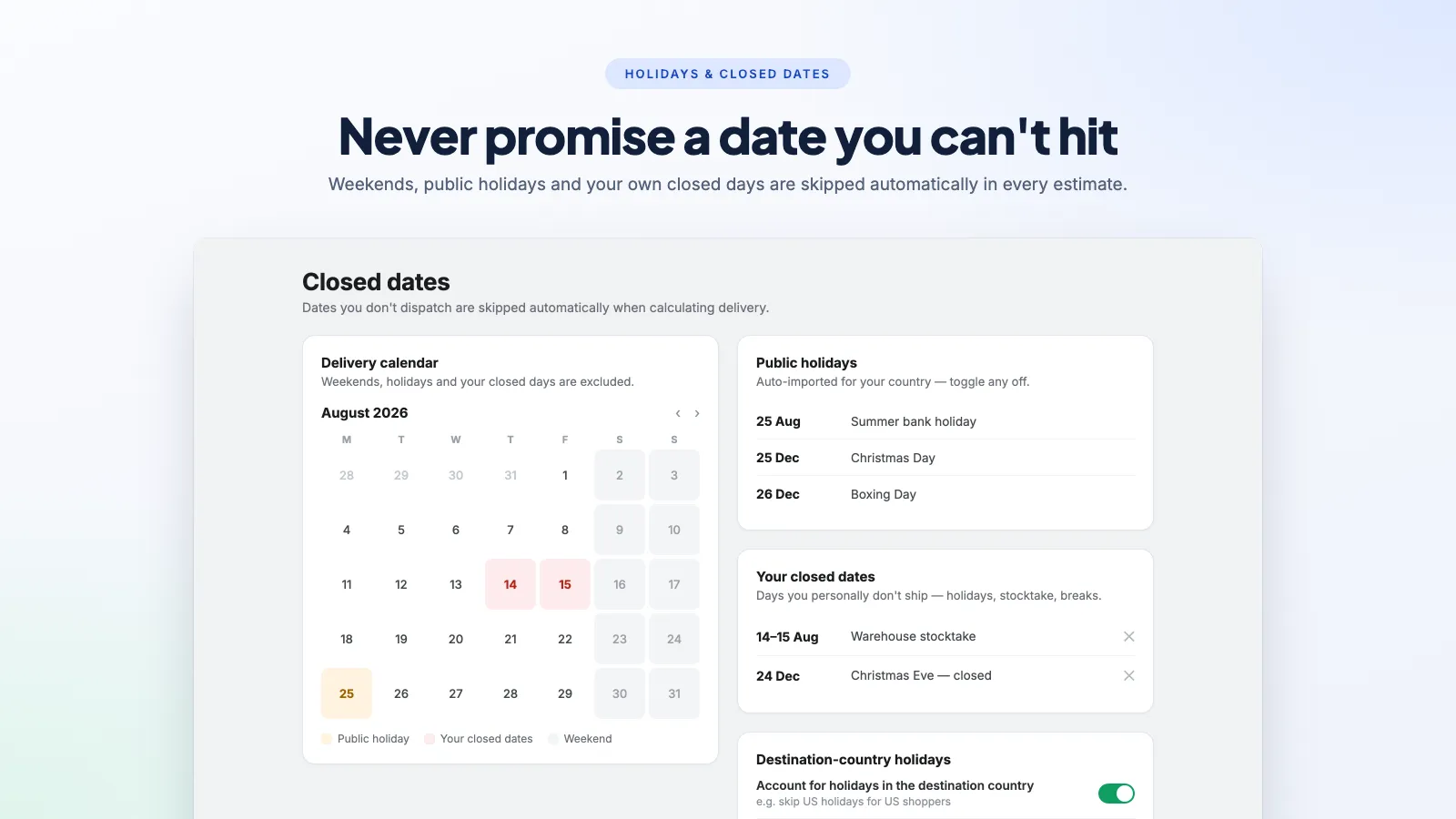
Start with the cut-off, because everything else depends on it
A cut-off is the time of day after which an order is processed the following working day. It is the first thing to set, because every other rule is measured from the dispatch date the cut-off produces.
- Set it to when you actually hand parcels over, not when you would like to. If the courier collects at 15:00 and you need an hour to pack, the cut-off is 14:00, not 15:00.
- Set it in your warehouse's timezone, and check what the app does for a shopper in another one. An estimate that flips a day depending on where the browser is reads as broken.
- Give yourself a buffer on your busiest day. A cut-off that holds on a Tuesday can fail on the Monday after a promotion, and one missed batch generates more support work than the extra hour would have cost you in orders.
A live "order within 4h 12m" countdown against a real cut-off is one of the few genuinely honest urgency mechanics available, because the deadline exists whether or not the shopper is watching. That is a different thing from a timer invented to create pressure — the difference matters legally as well as ethically.
Working days, weekends and bank holidays
This is where estimates quietly go wrong, because the failure is invisible until a customer complains.
- Exclude the days you do not dispatch, not the days the calendar calls a weekend. A store that packs on Saturdays should count Saturdays.
- Bank holidays are per-country and they move. An app with a maintained holiday calendar for your dispatch country saves you the annual chore; one without means a manual list every January.
- Carrier working days are not your working days. You might dispatch on a Saturday and have the courier not move it until Monday. If the app models only one of the two, the estimate will be a day optimistic every weekend.
- Watch the December case specifically. Christmas is the period when the most orders are placed, the most days are non-working, and a wrong date does the most damage.
Your own closed dates
Separate from public holidays: the days you personally are not shipping. Small stores tend to handle these by putting a banner up and hoping, which does not touch the delivery estimate the shopper is actually reading.
- Holiday closures — block the range in advance rather than the day before. Orders placed a week out are the ones that will arrive late.
- Stock-take, trade shows, illness — anything that stops dispatch for a day is a closed date, even if the shop stays open.
- Supplier lead times on made-to-order products — these belong as a per-product processing time, not a store-wide closed date, or you delay the things you could have shipped today.
Per-product processing times
Once your catalogue contains more than one kind of thing, a single store-wide processing time is wrong for most of it. The stocked item that ships this afternoon and the engraved one that takes five days cannot share an estimate.
- Identify the products that do not ship from stock — made-to-order, personalised, dropshipped, or anything you order in on demand.
- Give each a processing time of its own. A product metafield is the usual mechanism, and most delivery date apps read one; some offer per-collection or per-tag rules instead, which is easier to maintain across a large catalogue.
- Decide what a mixed cart does. If someone buys a stocked item and a made-to-order item together, does the order ship complete or in two parcels? The estimate has to match whichever you actually do.
- Re-check after a supplier change. Processing times set once and never revisited are the second most common source of a wrong date, after non-working days.
Where all of this ends up on the page — and how to word it so a range does not read as evasive — is covered in how to show delivery dates on Shopify product pages.
How to test it properly
- Load a product page just before your cut-off and again just after. The date must move by one working day. If it does not, the cut-off is not wired to the calculation.
- Check a Friday afternoon. The estimate should skip to Monday, or to Tuesday if Monday is a bank holiday.
- Check the day before a known closed date, and the day after.
- Check a made-to-order product against a stocked one. If they show the same date, per-product processing is not applied.
- Change country. Transit time should change; the cut-off should not.
Our own app, Delivery Date & Rates — ETA, models cut-offs, weekends, per-country public holidays and your own blackout dates as part of the calculation rather than as an afterthought, and shows the shipping cost beside the date. It is $7.99/month with a 14-day free trial. There are also free apps in this category that handle cut-offs and holidays well — compared here — and if one of those fits, use it.
Frequently asked questions
What is an order cut-off time?
The time of day after which an order is processed the next working day rather than the same one. If you pack until 14:00, an order at 13:55 ships today and one at 14:05 ships tomorrow. Every delivery estimate is measured from the dispatch date the cut-off produces, which is why it is the first thing to configure.
How do I stop Shopify counting weekends in delivery estimates?
Shopify itself does not calculate delivery estimates — that comes from your theme or an app, and the working-day setting lives there. Set the days you actually dispatch rather than accepting a default, and check separately whether the app also models carrier working days, since those can differ from yours.
Do bank holidays update automatically?
Only if the app maintains a holiday calendar for your dispatch country. Some do and some expect you to enter dates by hand. Ask before you install, because the manual version is a job you will forget to do in January and be reminded of in April.
Should I show a cut-off countdown?
Yes, if the cut-off is real. "Order within 4h 12m for dispatch today" is true, useful and creates genuine urgency. A timer that resets on every visit is a manufactured deadline, which UK and EU consumer protection rules treat as a misleading practice.
How do I handle products with different lead times?
Give them their own processing time, usually through a product metafield or a per-tag rule, so a five-day made-to-order item is not averaged in with stock you ship the same afternoon. Then decide explicitly what a mixed cart shows, because that is the case most setups get wrong.
Never promise a date you cannot hit
Cut-offs, weekends, per-country public holidays and your own closed dates built into the calculation — with the shipping cost shown beside the date. 14-day free trial.
How to show estimated delivery dates on Shopify
Why "3-5 business days" costs you sales, and the three ways to put a real date on the product page instead.
How to show delivery dates on Shopify product pages
Getting the date right is half the job. Where it sits on the page, and how it is worded, decides whether anyone acts on it.
The best Shopify delivery date apps, compared
There are good free options in this category, which changes the question from "which app" to "what do you actually need that free does not do".