Shopify countdown timers: urgency that is not a lie
Countdown timers have a bad reputation, and mostly they have earned it. A timer that resets when you open the page in a private window is not urgency — it is a trick with an expiry date of about thirty seconds. But the underlying idea is sound, and there is a version of it that holds up when a shopper checks. This guide covers the difference, and how to run the honest version on Shopify.
·9 min read
Why urgency works, and where it stops working
A deadline converts because it removes the third option. Without one, a shopper has three choices — buy, leave, or come back later — and "later" is the one that quietly wins, because it costs nothing today. A real deadline deletes it.
It stops working the moment the deadline is discovered to be fictional. And it is discovered: shoppers open a second tab, come back tomorrow, or check on their phone. A timer that has reset teaches them that nothing on the page can be trusted, including the reviews and the stock levels.
“The test is simple. If a customer screenshots your timer, comes back tomorrow, and finds the same offer running, what have you actually told them?”
The three kinds of Shopify timer
| Type | How it behaves | The problem |
|---|---|---|
| Fixed-date | Counts down to one moment for everyone — sale ends Sunday midnight. | Honest and simple, but urgency is weak weeks out and the page is dead the day after. |
| Evergreen / per-visitor | Starts when each visitor arrives, usually stored in a cookie. | Resets on a new browser, private window or cleared cookies. The claim is false, and it is trivially checkable. |
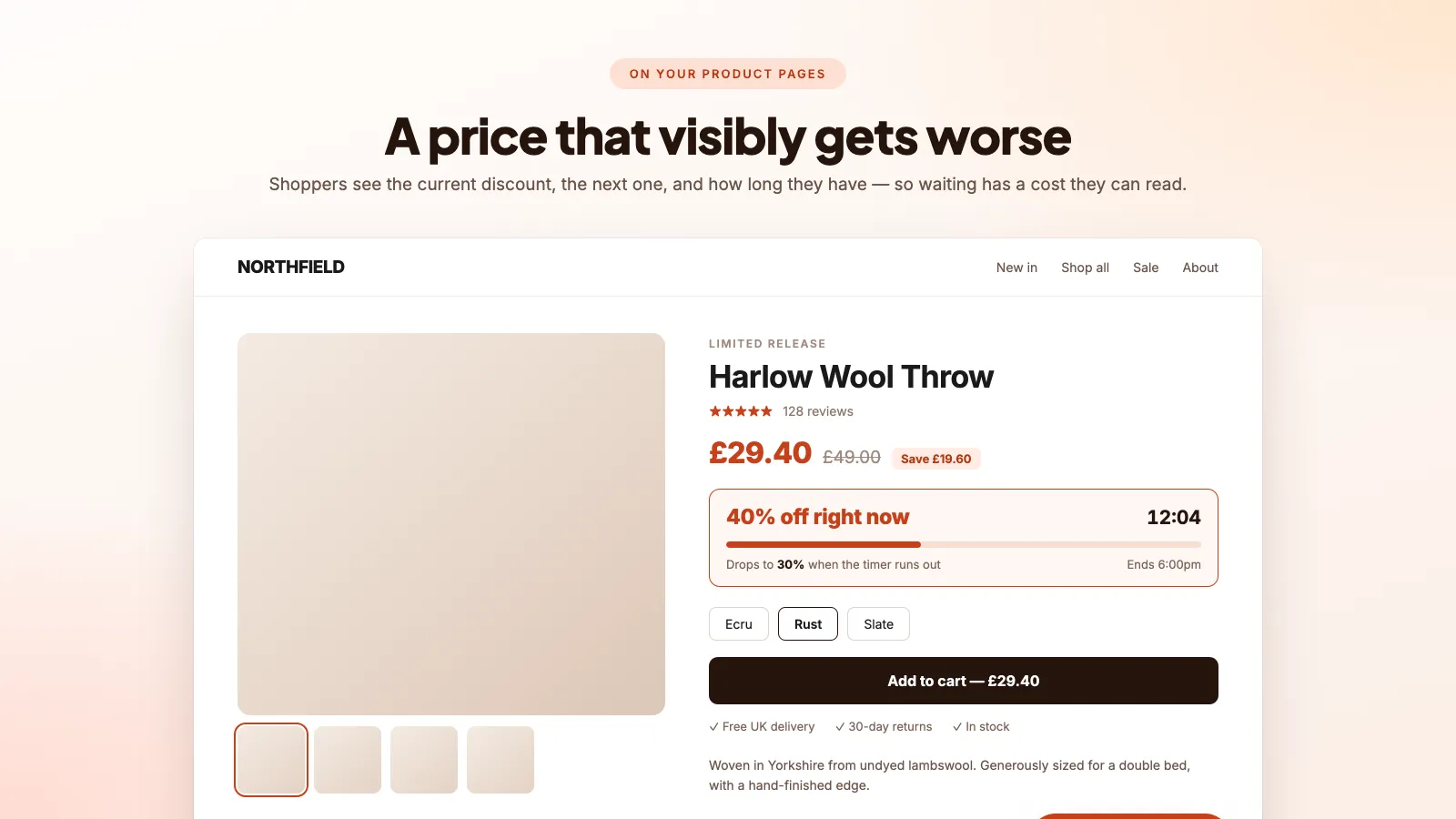
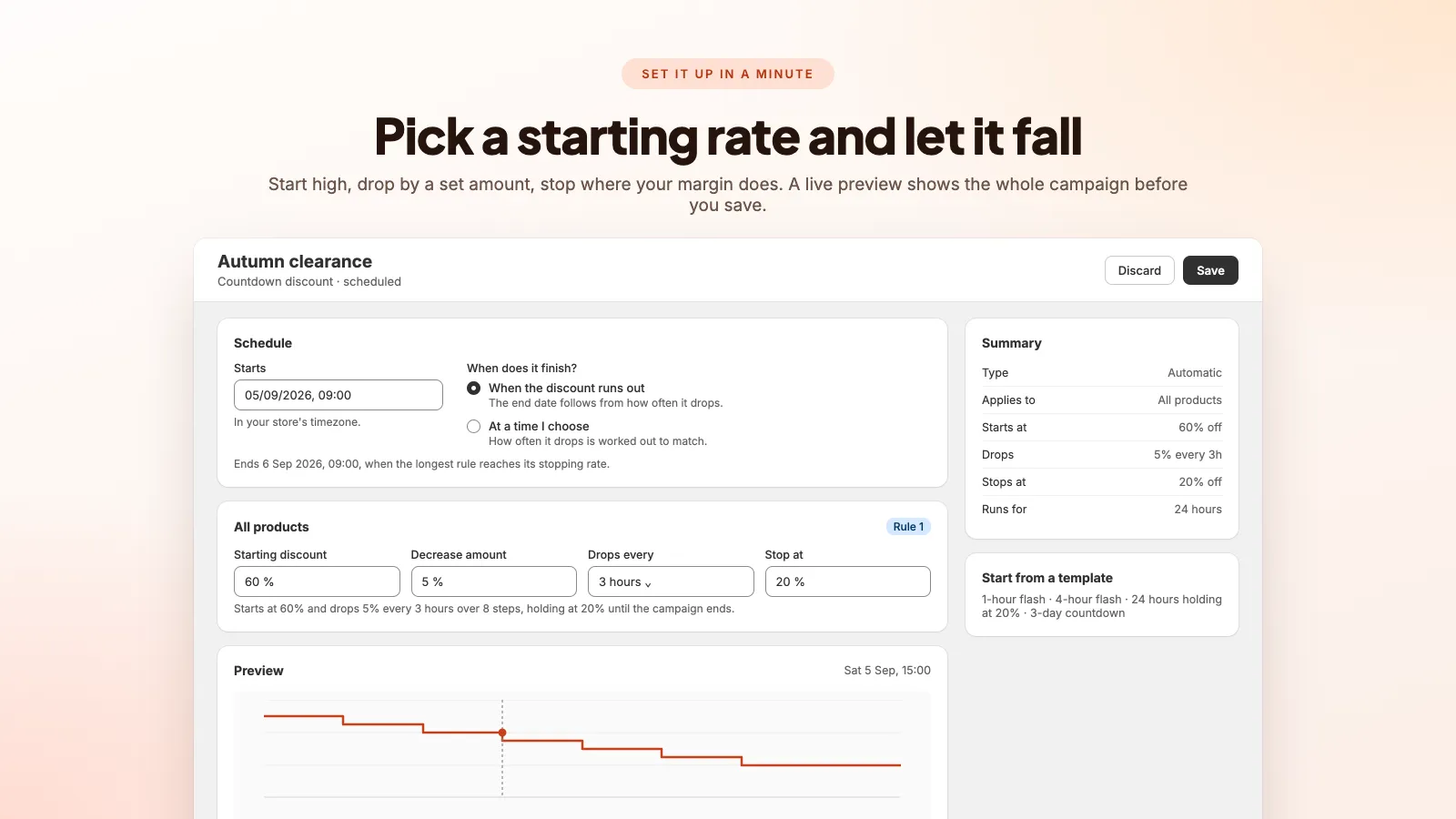
| Decreasing discount | A real discount that steps down on a published schedule — 60% now, 55% in three hours, floor at 20%. | Needs actual discount automation behind it, not just a graphic. |
The third is the one worth running. The urgency is not a claim about the timer, it is a fact about the price: wait three hours and the discount is genuinely smaller. A shopper who checks finds the mechanism working exactly as described, which builds trust rather than spending it.
Running a decreasing discount properly
- 01
Pick a start rate you can afford and a floor you will not cross
The floor is the important number — it is your margin. Start at 60%, drop 5% every three hours, stop at 20%: below that, the discount stops moving regardless of how long the campaign runs.
- 02
Publish the schedule on the page
Show the current discount, what it drops to next, and when. Hiding the schedule turns a legitimate mechanism into something that looks like a trick, and you lose the trust benefit that made it worth doing.
- 03
Put the timer where the price is
A floating pill for site-wide awareness, an inline block under the price, and a banner above the checkout button. The one next to the price does the most work, because that is where the number it refers to lives.
- 04
Read the results before the next one
If orders cluster at 40%, you opened too high and gave away twenty points for nothing. Open the next campaign at 45%. This is the part almost everybody skips, and it is where the money is.
The legal side, briefly
This is a real regulatory area, not a theoretical one. UK and EU consumer protection rules treat false urgency as a misleading commercial practice, and the EU's Omnibus Directive requires that a "was" price shown in a discount be the lowest price charged in the previous 30 days. The FTC has brought enforcement action over fake countdown timers in the US.
- Do not claim a deadline that does not exist. An evergreen timer presented as a sale deadline is exactly the practice these rules describe.
- Do not inflate a reference price to manufacture a discount. If it never sold at £100, it is not £100 down to £40.
- Do end the sale when the sale ends. Relaunching the identical offer the next morning under a new banner is the same claim wearing a hat.
Timers and site speed
A countdown is a small thing that can do disproportionate damage to Core Web Vitals, because it renders late and it renders near the top of the page.
- Layout shift: a timer that appears after load pushes the price and the Add to cart button down. That is a Cumulative Layout Shift penalty, and worse, it is a mis-click.
- Reserve the space. The container should occupy its final height before the numbers arrive.
- Prefer a theme app extension over an injected script. Extensions render with the page rather than after it, and uninstalling one removes it cleanly.
Our Shopify Core Web Vitals guide covers the wider version of this problem — every app you install has a cost, and most stores have never measured theirs.
Frequently asked questions
Do countdown timers actually increase conversions on Shopify?
A genuine deadline does, because it removes the "buy it later" option that quietly absorbs most undecided traffic. A fake one produces a short-lived lift followed by a trust problem you cannot see in your analytics — the shoppers who noticed simply do not come back.
Are evergreen countdown timers against Shopify's rules?
Shopify does not police the mechanic itself, but consumer protection regulators do. In the UK and EU, presenting a per-visitor timer as a real sale deadline falls squarely under misleading-practice rules, and the FTC has pursued the same thing in the US.
What discount should a decreasing campaign start at?
High enough to be interesting, with a floor set at the margin you are unwilling to go below. Then let the first campaign tell you: if most orders land at 40%, open the next one nearer 40% and keep the difference. Guessing once is unavoidable; guessing twice is a choice.
Will a countdown timer work inside a cart drawer?
Only if the app supports it. Cart drawers are rendered dynamically, so a timer bound to the initial page load often appears frozen or vanishes entirely when the drawer opens. Test it in your own theme before launching a campaign around it.
Urgency that survives a second look
A discount that genuinely steps down on a schedule you set, with a floor that protects your margin — and analytics showing which step actually sold. From $5.99/month.
Shopify product bundles and add-ons that raise AOV
Bundle, add-on, upsell and cross-sell are four different mechanics. Using the wrong one is why most AOV experiments do nothing.
Shopify Core Web Vitals: what actually slows a store down
Your PageSpeed score is not what Google ranks on. Here is the number that counts, and the four things on a Shopify store that usually ruin it.
How to import Etsy reviews to Shopify
A step-by-step comparison of the manual CSV route and the automatic sync route — including the parts of the CSV method nobody warns you about.