How to import Etsy reviews to Shopify
You spent years earning five-star reviews on Etsy. Then you open a Shopify store and the product pages sit there with nothing — no ratings, no photos, no proof anyone has ever bought from you. This guide covers the two realistic ways to move that social proof across, what each one actually costs you in time, and the limitations you only discover halfway through.
·9 min read
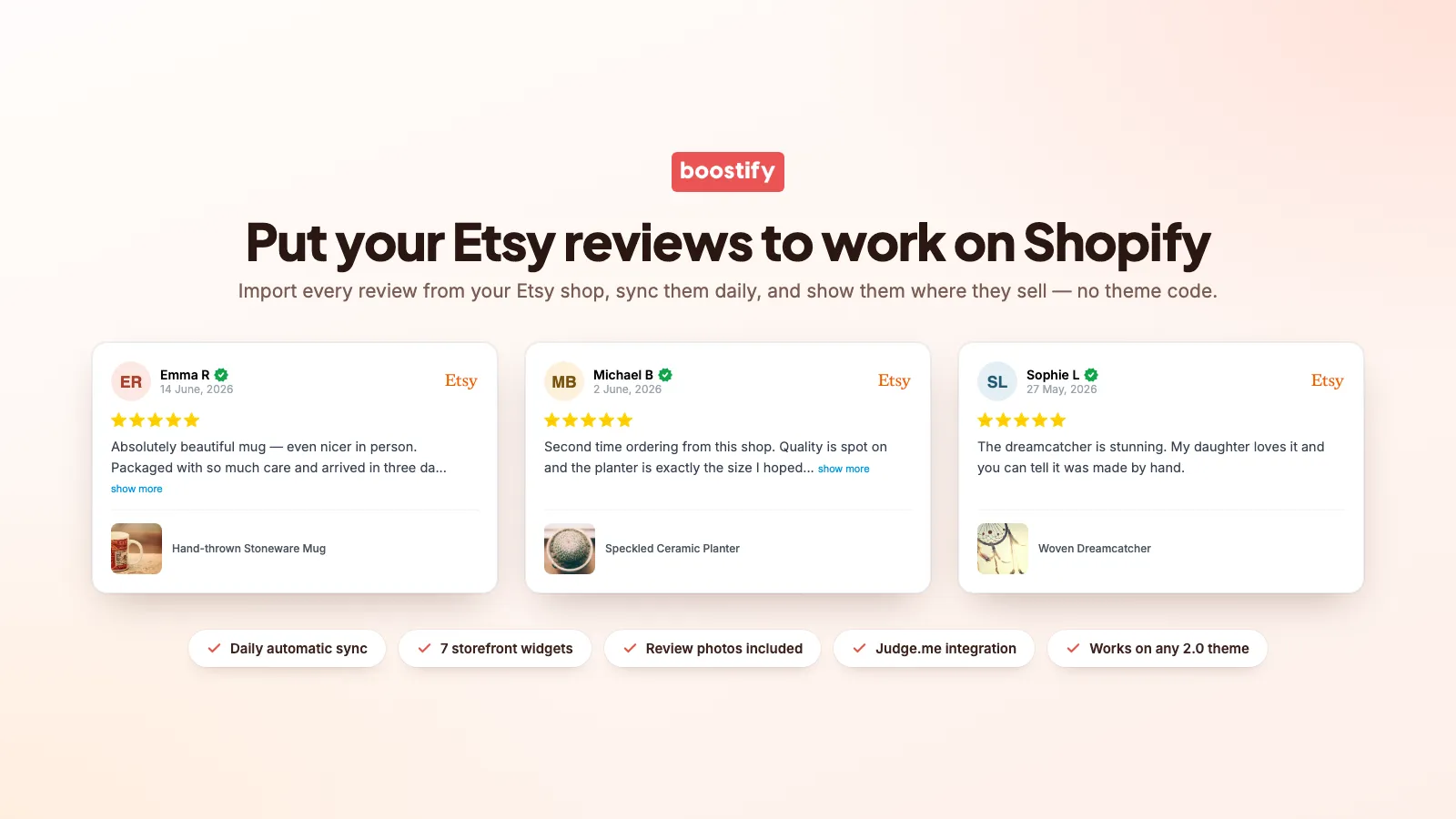
First: are you allowed to show Etsy reviews on Shopify?
Yes, for your own shop. The reviews were written about your products by your customers, and displaying your own customer feedback on your own website is normal practice. Two things to keep straight:
- They are your reviews, not another seller's. Copying a competitor's Etsy reviews onto your store is straightforward misrepresentation, and it is the fastest way to a consumer-protection complaint.
- Do not quietly rewrite them. Edit a review's wording and it stops being a review. Filtering which reviews you display is fine; editing what a customer said is not.
Most sellers also choose to keep the Etsy branding visible on the widget, because "verified Etsy review" carries more weight with a shopper than an unattributed testimonial. That is a conversion decision rather than a legal one — either way, be honest about where the review came from.
Option 1: the manual CSV import
The free route. It works, but be clear-eyed about the effort: Etsy has no "export my reviews" button. Etsy will export your orders and your listings as CSV — not your reviews. So step one is copying them out by hand.
- 01
Collect the reviews from Etsy
Open your shop's reviews page and work through it. For each review you need the star rating, the review text, the date, the buyer's display name and the item it was left against. There is no shortcut — it is copy and paste, and a shop with 400 reviews is a long evening.
- 02
Build the CSV in the format your review app expects
Shopify's own free Product Reviews app was retired, so you need a third-party review app to hold the imported reviews. Judge.me, Loox, Okendo and the rest each publish their own CSV template — typically columns for product handle, rating, review title, review body, reviewer name, reviewer email and review date. Download that app's sample file and match its column headers exactly.
- 03
Match each review to a Shopify product
This is where most imports go wrong. The CSV links a review to a product by handle or SKU, and your Shopify handles almost never match your Etsy listing titles. Every mismatch either fails the import or silently attaches the review to the wrong product.
- 04
Upload and check
Import the file, then spot-check a dozen product pages. Reviews that land on the wrong product are worse than no reviews at all.
Option 2: an app that imports and syncs automatically
The alternative is a purpose-built app that reads your public Etsy shop reviews, keeps them updated on a schedule and gives you storefront widgets to display them. Setup is minutes rather than an evening, and it stays current on its own. That is what Boostify Etsy Reviews Importer does, and the steps below describe it, but the shape is the same whichever sync app you pick.
- 01
Install the app and point it at your Etsy shop
You give it your Etsy shop name. There is no Etsy password involved — the reviews on your shop page are public, which is exactly why they work as social proof.
- 02
Let the first import run
Your review history comes in, including the buyer photos, which is the piece the CSV route loses.
- 03
Link Shopify products to their Etsy listings
Matching a Shopify product to the Etsy listing it came from is what makes a product page show its own reviews rather than a generic shop feed. Do this for your bestsellers first; the rest can fall back to shop-wide reviews.
- 04
Add a widget in the theme editor
On an Online Store 2.0 theme the widgets are theme blocks: open the theme editor, hit "Add block", pick where it goes. No Liquid, no developer, and you can drag it above or below the buy button to test placement.
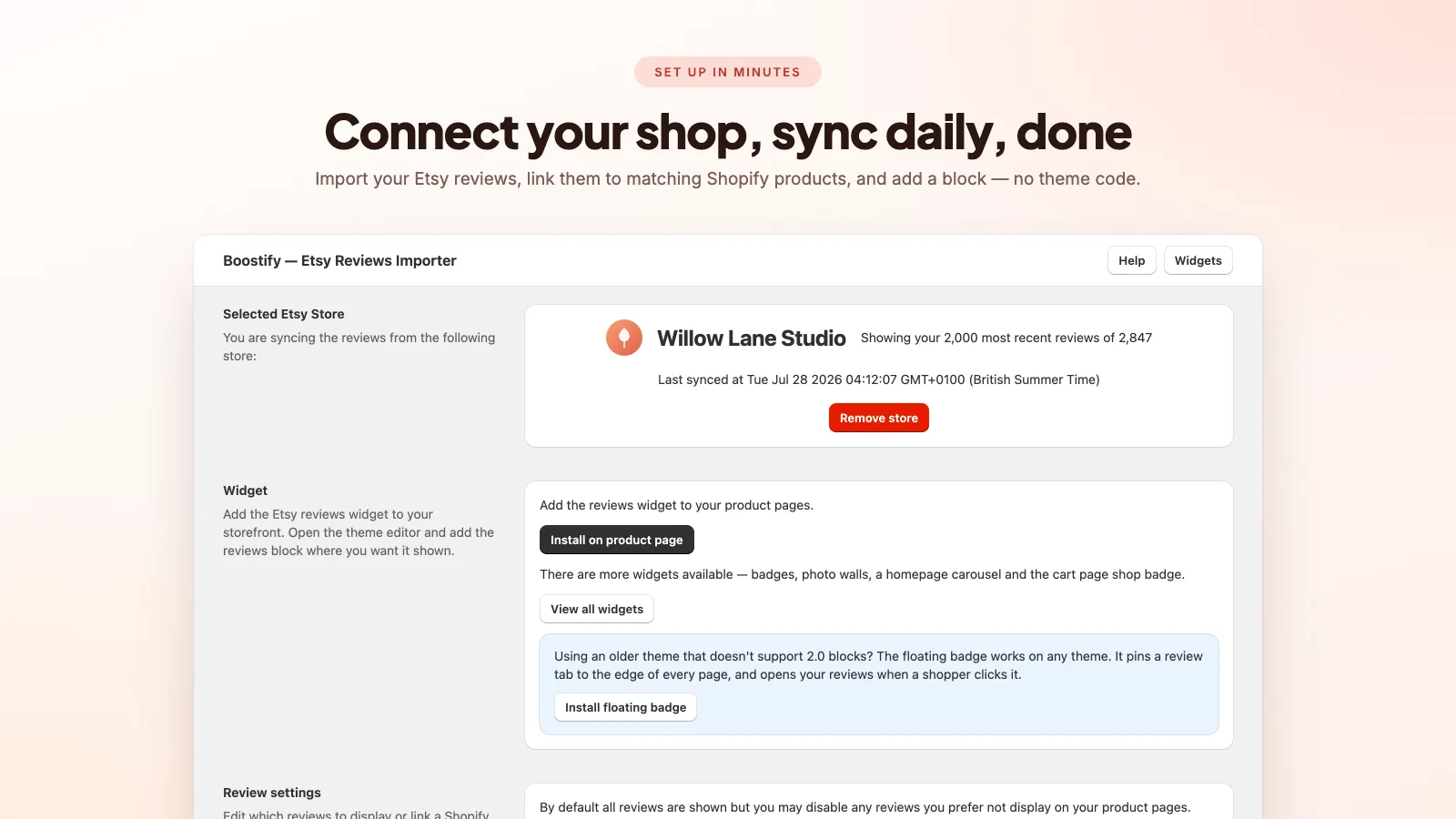
From then on the sync runs daily, so a review left on Etsy on Tuesday shows up on your Shopify product page on Wednesday without you doing anything.
Which method should you use?
| Manual CSV | Sync app | |
|---|---|---|
| Cost | Free (plus your review app) | Around $5–7/month |
| Setup time | Hours — it scales with review count | Roughly 10 minutes |
| Buyer photos | Lost, unless you self-host every image | Imported |
| New Etsy reviews | Manual re-import every time | Picked up automatically |
| Product-level matching | You maintain the mapping by hand | Set once per product |
| Shop rating / sold count | Not possible | Available as a badge widget |
The honest split: if you have fewer than about 30 reviews and no photos worth keeping, do it manually and spend the money elsewhere. Past that — or if you are still actively selling on Etsy and earning new reviews — the manual route becomes a recurring chore you will quietly stop doing after month two. If you want the sync apps weighed against each other first, we compared the Etsy review apps for Shopify — ours included, with its review count stated plainly.
Where to display imported reviews
Getting the reviews into Shopify is half the job. Where you put them decides whether they change anyone's mind. Placements worth having:
- Product page carousel — directly under the buy button, showing that product's own reviews. This is the placement that moves conversion rate.
- Product review badge — a compact star rating and count near the price, visible without scrolling.
- Homepage carousel — social proof before a visitor has picked a product.
- Review grid — a masonry wall for a dedicated reviews or about page.
- Photo wall — customer photos only, which for handmade and personalised products often sells harder than the text.
- Shop badge — your overall Etsy rating and total sold count, useful in the footer or on an about page.
- Floating badge — a persistent tab pinned to the edge of the screen on every page.

If you only do one thing, put reviews for that specific product on that specific product page. Generic shop-wide praise below a listing is far weaker than three people describing the exact item in the cart. There is a walkthrough of exactly that in how to show Etsy reviews on Shopify product pages.
Do imported reviews help your SEO?
Partly — and there is a lot of nonsense written about this, so here is the careful version.
What genuinely helps is that the reviews become real, crawlable text on your storefront. A widget that injects reviews inside an iframe, or paints them in with JavaScript after the page loads, gives search engines much less to work with. Widgets rendered server-side in Liquid put the review text in the HTML alongside the rest of the page, where it adds relevant, unique, long-tail content in your customers' own words.
What does not automatically follow is star ratings appearing in Google results. Those come from review structured data, and Google's guidelines are strict about which reviews qualify — reviews collected on another platform and republished on your own site generally do not earn product rich results. Any app promising you Google stars from imported third-party reviews is overselling. Treat imported reviews as a conversion tool and a content signal, not a rich-snippet shortcut.
Common problems, and what causes them
- Reviews imported but nothing on the storefront — the theme block was never added. Importing fills the database; the theme editor decides what renders.
- A product page shows unrelated reviews — that product is not linked to its Etsy listing, so it is falling back to shop-wide reviews. Link it, or turn the fallback off.
- A product page shows nothing at all — product-matching is on, that product has no Etsy reviews yet, and the fallback is disabled. Enable the fallback so the space is never empty.
- New Etsy reviews are not appearing — the sync runs on a schedule, so allow a day. If more than that, check the Etsy shop name is still correct and the shop is not in holiday or closed mode.
- Reviews disappeared after a theme change — theme blocks live in the theme, not the app. Switching or duplicating a theme means re-adding them.
Frequently asked questions
Can I export my Etsy reviews to a CSV file?
Not directly. Etsy exports orders and listings, but not reviews. To build a review CSV you copy the rating, text, date, buyer name and item out of your shop's reviews page by hand, which is why most sellers with a real review history use a sync app instead.
Will the buyer photos come across?
With a CSV import, usually not — importers expect image URLs you host yourself. A sync app pulls the photos in with the reviews, which matters for handmade and personalised products where the customer photo is the strongest part of the review.
Do I need my Etsy password or API access?
No. Your shop reviews page is public, so an app only needs your shop name to read them.
Can I hide bad reviews?
You can filter which reviews display — for example show only 4- and 5-star reviews, or only reviews with photos. Worth knowing that a page of nothing but perfect scores reads as fake to a lot of shoppers; a stray 4-star review tends to help.
Will imported reviews keep updating?
Only if you use an app that syncs. A CSV import is a one-off snapshot — every review you earn afterwards has to be copied across manually.
What does an Etsy review sync app cost?
Boostify Etsy Reviews Importer is $5.99 a month with a 7-day free trial, covering the import, the daily sync, review filtering, the seven storefront widgets and Judge.me review display in the same carousel.
Skip the copy and paste
Boostify Etsy Reviews Importer brings your Etsy reviews and buyer photos into Shopify, keeps them syncing daily, and gives you seven storefront widgets to display them. 7-day free trial.
How to show Etsy reviews on Shopify product pages
Importing reviews is the easy half. Placement, product matching and fallbacks are what decide whether they change anyone's mind.
The best Etsy review apps for Shopify, compared
Six apps do this job and they are not interchangeable. What separates them, what each costs, and which one suits which kind of shop.
Etsy Share & Save links, and how to use them alongside Shopify
Etsy pays you to bring your own traffic. Here is what the programme is worth, and how it fits a seller who also runs a Shopify store.